HealthAbout user guides, opportunities and news perspectives relative to health facilities, workers, medical consultants and patients involved with, or interested to use CHUDATS digital healthcare services.
CurrencyRegroups information on the financial system of CHUDATS which evolves around obtaining and using heal coins and heal notes, collectively addressed as Heal Cash
CharityGroups agendas, actions and news on humanitarian services and other community development assistance works within CHUDATS.
PolicyExamines engagements and outcomes of CHUDATS operations that create or promote global, national and local healthcare policies.
HealthAbout user guides, opportunities and news perspectives relative to health facilities, workers, medical consultants and patients involved with, or interested to use CHUDATS digital healthcare services.
CurrencyRegroups information on the financial system of CHUDATS which evolves around obtaining and using heal coins and heal notes, collectively addressed as Heal Cash
CharityGroups agendas, actions and news on humanitarian services and other community development assistance works within CHUDATS.
PolicyExamines engagements and outcomes of CHUDATS operations that create or promote global, national and local healthcare policies.
Health//About user guides, opportunities and news perspectives relative to health facilities, workers, medical consultants and patients involved with, or interested to use CHUDATS digital healthcare services.
Currency//Regroups information on the financial system of CHUDATS which evolves around obtaining and using heal coins and heal notes, collectively addressed as Heal Cash
Charity//Groups agendas, actions and news on humanitarian services and other community development assistance works within CHUDATS.
Policy//Examines engagements and outcomes of CHUDATS operations that create or promote global, national and local healthcare policies.
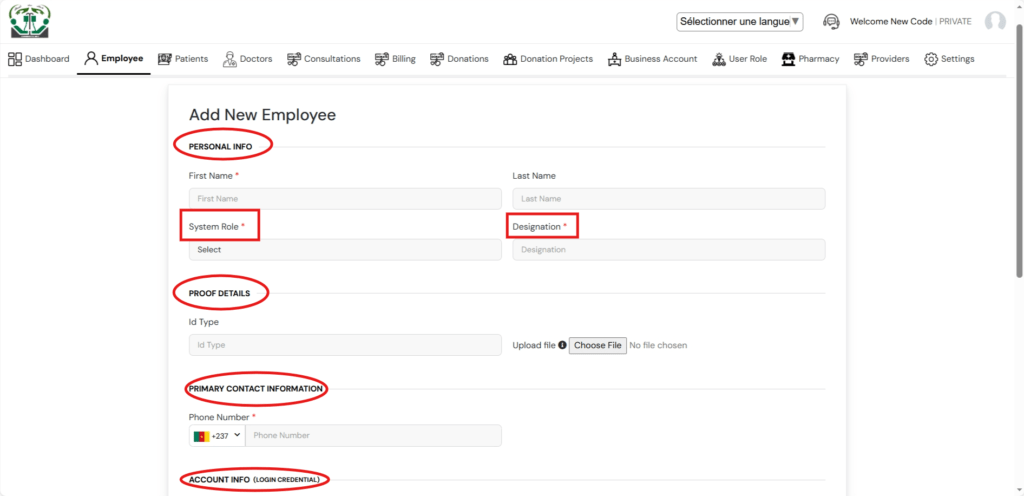
On the employee module, you begin by adding a new employee. This takes you to the Add Employee form where you are expected to fill in the requested information of the employee including the personal information, proof of details, primary contact information, and the employ’s login account information.
Notably, you are required to apportion a system role to an employee which grants the new employee privileges and limits to login and use the employee’s account and designation or designated duty post.
This is controlled by the user roles module.
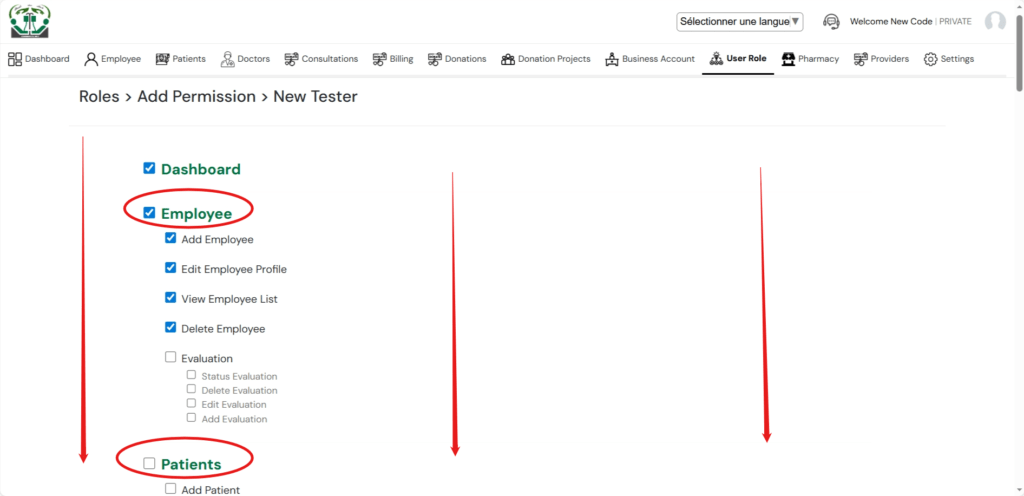
Before adding an employee, the healthcare facility admin needs to primarily create user roles for a list of the designated or needed work posts within the facility. You begin by opening the module, add and name a new role. You can add as many roles as needed. In the list of the roles, open each role added, and further tick permissions to such roles. The permissions grant user rights and listed privileges to access and management various components within the healthcare facility’s admin system.
The system roles granted to employees will therefore limit their accessibility to the functionalities they can access and manipulate when logged-in.
Within the employee’s module, the facility’s admin can also control the employee’s:
Job and pay details that includes a payslip;
Employment history;
Evaluation by a designated supervisor;
Decisions and documents created before and/or during the employment.