Access and manage H-doctor and H-patient panels

H-Doctor's Panel

With a dedicated account created by the subscribed health facility admin, the doctor is able to log-in and perform several operations:

  • Access doctor’s profile and add or update documents
  • Add and update history related to clinical research and clinical trials
  • Create availability slots for bookings and consultations
  • Get reminders and notifications

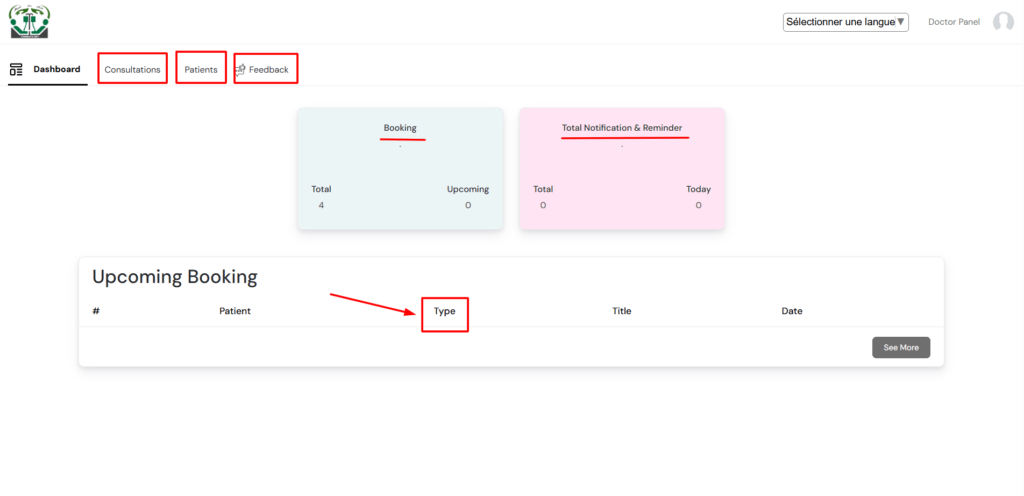
On the doctor’s dashboard, the doctor can preview all the pending bookings and notifications. Since the h-doctor is able to conduct both online consultations and at the hospital level, he or she can quickly see the list of and type of different upcoming bookings to prepare for.

From the dashboard modules, the doctor is able to see all appointments and consultations made, see a list of all his or her patients, and view all reviews made.

H-doctor's dashboard

H-Patient Panel

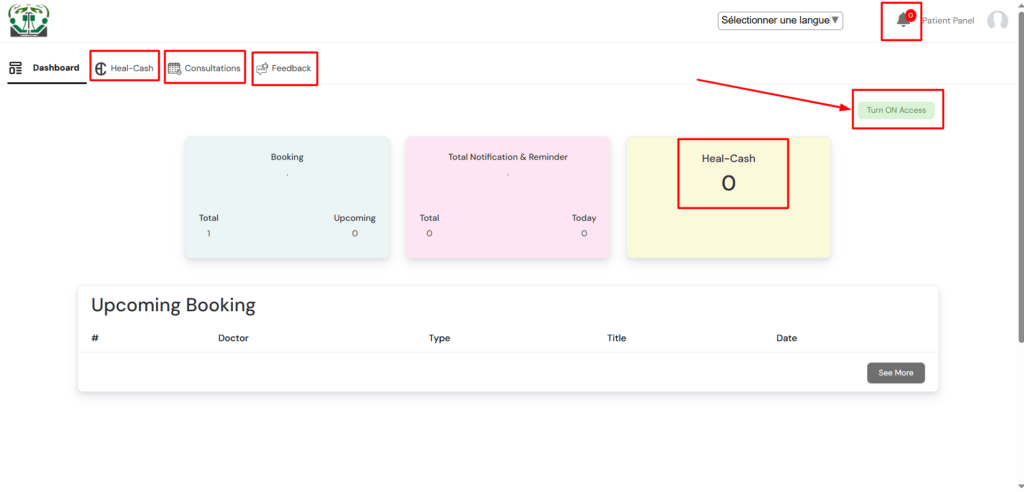
The h-patient account is a key component requisite for the health facility admin to access and freely process patient data. Our patient data access security concerns require that only the patient should be able to grant access to his or her electronic medical records or healthcare data. Through the h-patient panel or account login, the following items are managed:

h-patient dashboard
  1. The button to TURN-ON or TURN-OFF access to the patient’s healthcare data. When the view is “TURN-ON” it means the access is off. In this case no health facility is able to see the patient’s records apart from the patient’s basic info. Alternatively, when the patient presents the QR ID card for scanning at any approved user health facility admin, the access is automatically turned-on and permits the scanning hospital to be able to view and make consultations with patient.
  2. The h-patient’s heal-cash wallet. The patient has the possibility to add healcoins into the wallet and can be able to make payments for hospital bills and other healthcare needs. This also helps in monitoring the h-patient’s HC flows.
  3. Almost similar to a health facility’s admin consultation module, the h-patient is granted a privileged opportunity to create appointments through the panel by picking a health facility or hospital of choice, a doctor of choice and booking an available appointment slot to meet only the particular doctor in the particular hospital. This type of booking bears same online consultation charges applied for the chosen h-doctor to an m-patient but the appointment is to be attended to at the hospital chosen.
  4. The h-patient is also granted the opportunity to rate both the treating hospital and the assigned doctors in question.
  5. Within the profile at the h-patient panel, the patient is able to see and confirm payments for medical bills notifications and pharmacy POS charges. The profile also shows the entire patient’s healthcare data including contacts, address, insurance, medical bills, medical reports, lab reports, HC donation details, prescriptions, as well as other reminders and notifications.

0 Votes: 0 Upvotes, 0 Downvotes (0 Points)

Leave a reply

Previous Post

Next Post

Recent Comments

Join Us
  • Facebook
  • X Network
  • Instagram
  • WhatsApp Channel

Stay Informed With the Latest & Most Important News

I consent to receive newsletter via email. For further information, please review our Privacy Policy

Advert

Loading Next Post...
Follow Us
Search Trending
Popular Now
Loading

Signing-in 3 seconds...

Signing-up 3 seconds...